• How to Fill Out + Send 1099-MISC forms
If you paid any Independent Contractors more than $600 in one year, for service work, you need to submit a 1099-MISC form (1099 for short).....both to the Recipient and to the IRS. To read more, click here.
Time Required: 5 - 10 minutes per form (+more time if you have to collect W-9s)
Cost: About $1.50 in postage to IRS + any postage costs to mail to recipients
Due: January 31st
Frustration: 3 out of 10
Tedium Factor: 10 out of 10
Summary
On a half sheet form, you fill in a few boxes. Your name, address, phone number, and tax ID number. Your recipients name, address, tax ID number. The amount you paid them.
You send a copy to the recipient, to the IRS, and you keep one for yourself.
In addition, you must work with two more forms. A 1096 acts as a cover sheet when mailing 1099-MISCs to the IRS. Use W-9s to collect information from recipients. More below....
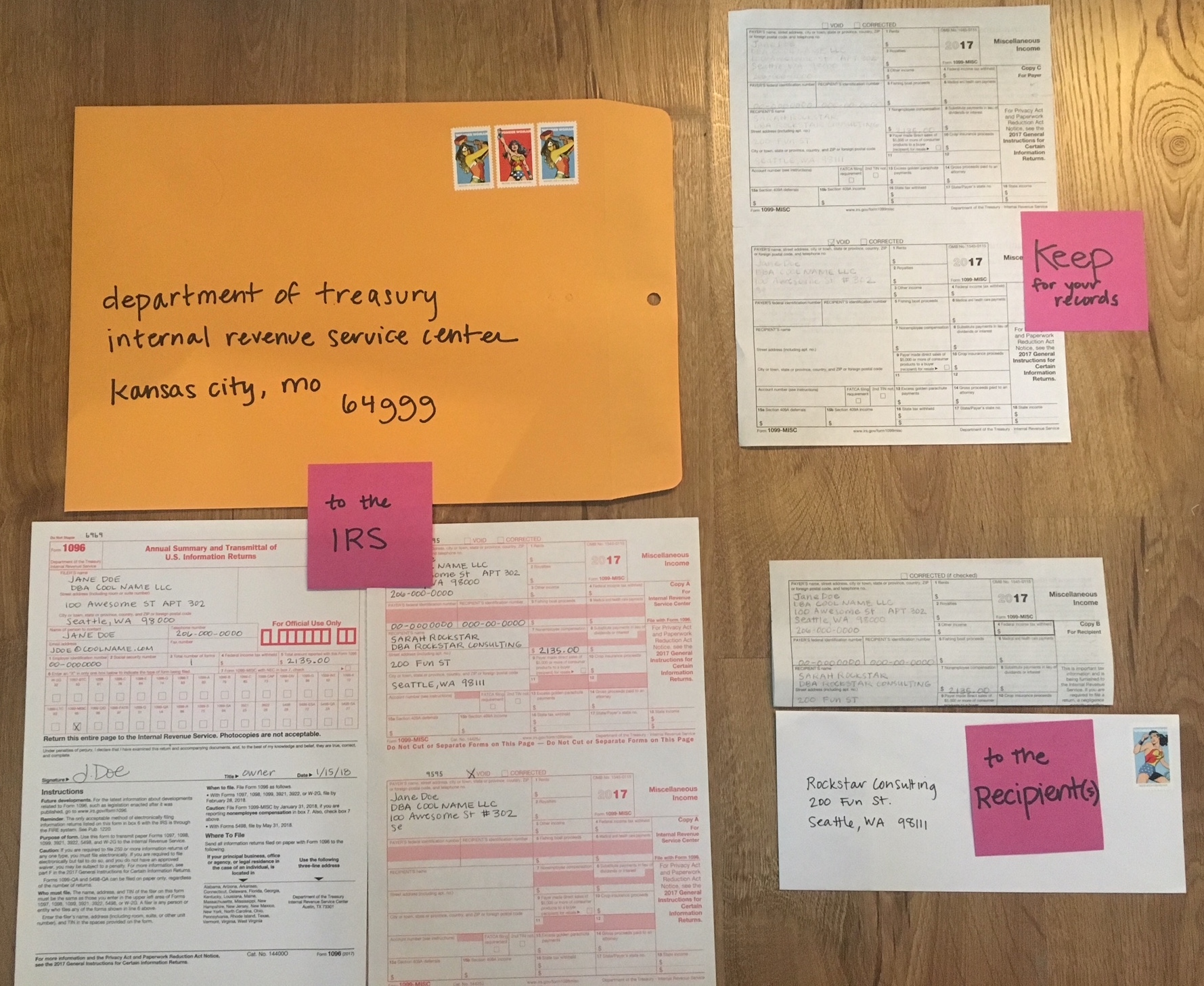
Photos with notes below. First some information.
You can choose to use paper forms or to file electronically.
Paper forms are carbon and MUST be ordered from the IRS or another source. They canNOT be printed. To ORDER forms, click here. To see a walkthrough of ordering forms, click here.
I haven't worked with e-filing yet. Some tax software systems provide this, such as TurboTax. The IRS also gives this tip, "To locate an IRS business partner who may be able to offer low-cost or even free filing of certain forms, enter "e-file for business partners" in the search box on IRS.gov."
Some accountants will also do this for you.
What you need~
For each recipient:
• Full legal name (of the person)
• Legal name of the business
• Address
• Tax ID Number ~ Either their SSN (social security number) or EIN (employer ID number)
• Amount you paid them ~ called "Nonemployee compensation"
If filing with paper forms:
• 1096 Form
• Large Envelope
• Postage
• Black ball point pen
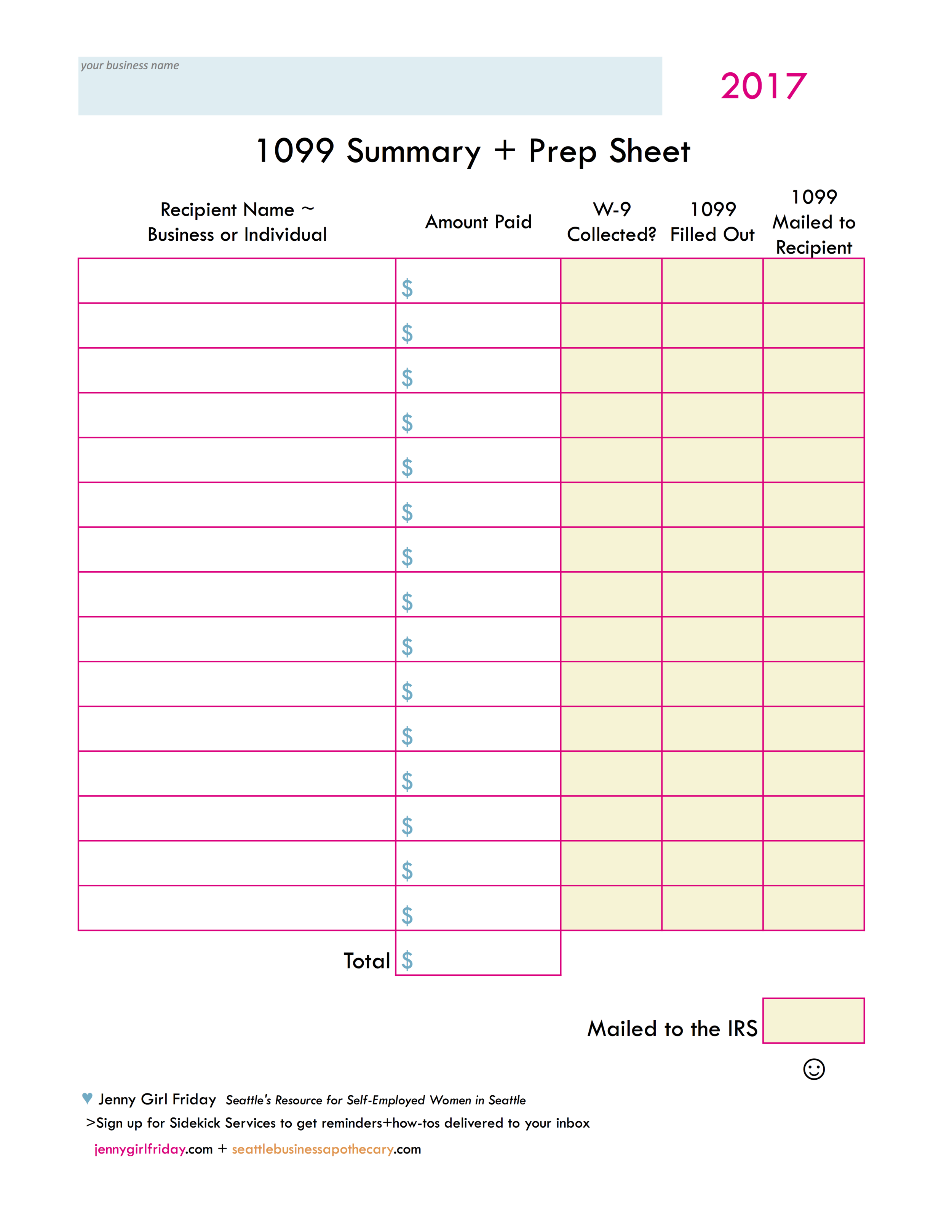
Use this prep sheet to keep things straight! Click on it to get a PDF. :) This will also help when it's time to file your IRS taxes later this Spring.
Heads Up! There are two more forms to know about! 1096 and W-9
Like the Charlie's Angels, there are actually 3 forms that you'll be working with! They always go together.
W-9 The IRS created a W-9 form to collect the required information from recipients, including their tax ID. It's a one page form with lots of pages attached. As you can imagine, tax ID numbers are sensitive information, and W-9 forms must be stored securely. You can collect W-9s on paper, or electronically. Click here to download from the IRS.gov site.
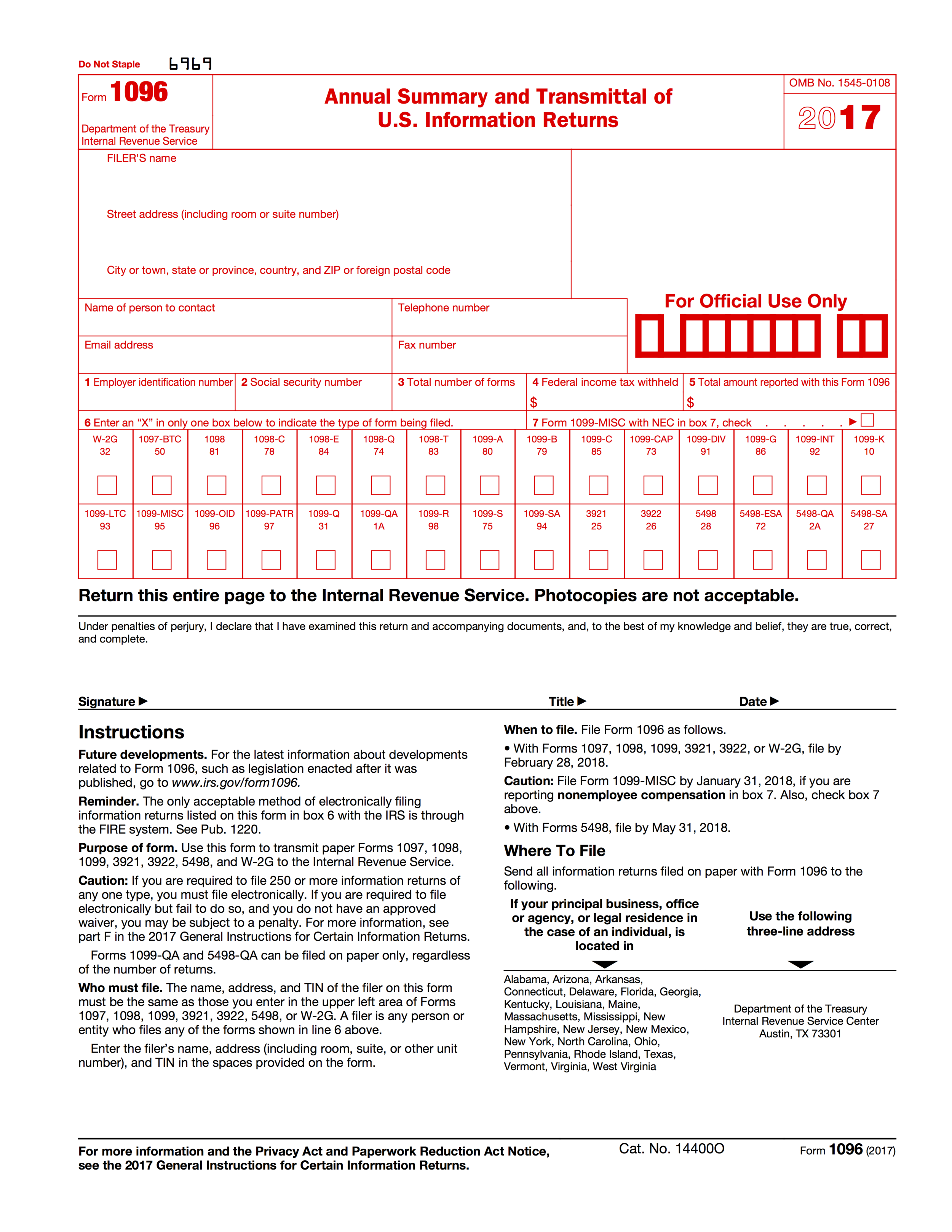
1096 This is like a cover letter. When you submit certain types of forms to the IRS, they want a 1096 as well. It's basically a summary of everything you're sending in.

Important Things to Know When Filling Out Paper Forms!
1. Use a BLACK ball point pen, press hard!
2. Use legible, block printing
3. Do NOT add any symbols. NO dollar signs, NO apostrophes, NO number signs.
For Susie's Flowers, you'd write: Susies Flowers
For an apartment #302, write APT 302
4. Do NOT cut the 1099 form top sheet (the one you send to the IRS)
5. Write the dollars + cents for all amounts. For example, 1235.00 is correct. (1235 is NOT correct.)
> > If you happen to make any mistakes, check the VOID box at the top of the form, and start again.
Mailing Information
• Address for Washington Residents:
Department of the Treasury
Internal Revenue Service
Kansas City, MO 64999
• You must use a FLAT envelope, with no folds.
• It must be postmarked on or before January 31, 2018.
1099-MISCs Forms
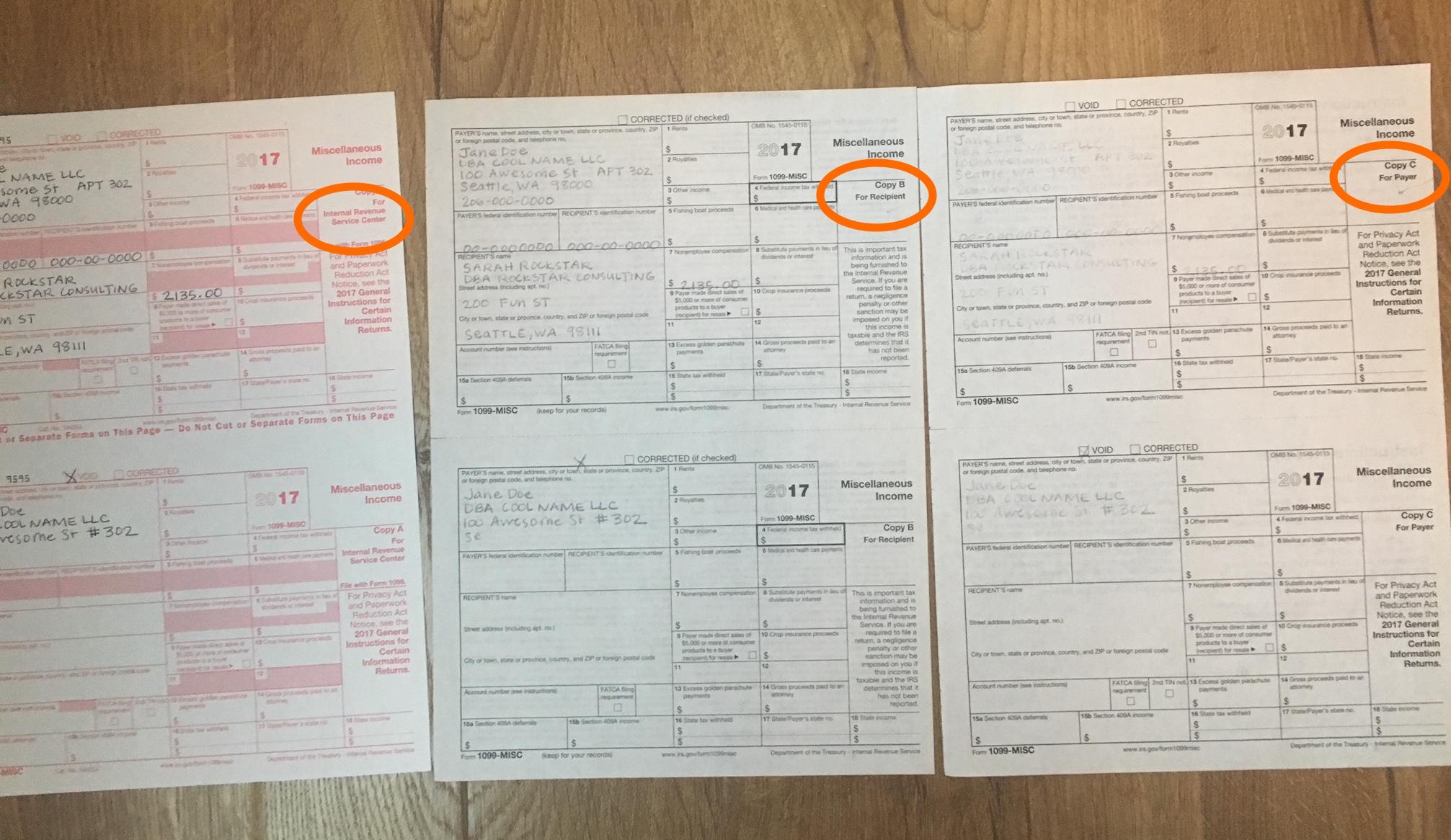
Two separate forms are on each page. This shows the top sheet which is sent to the IRS. Do NOT cut this page. The pages underneath are torn in half before giving to the recipients.
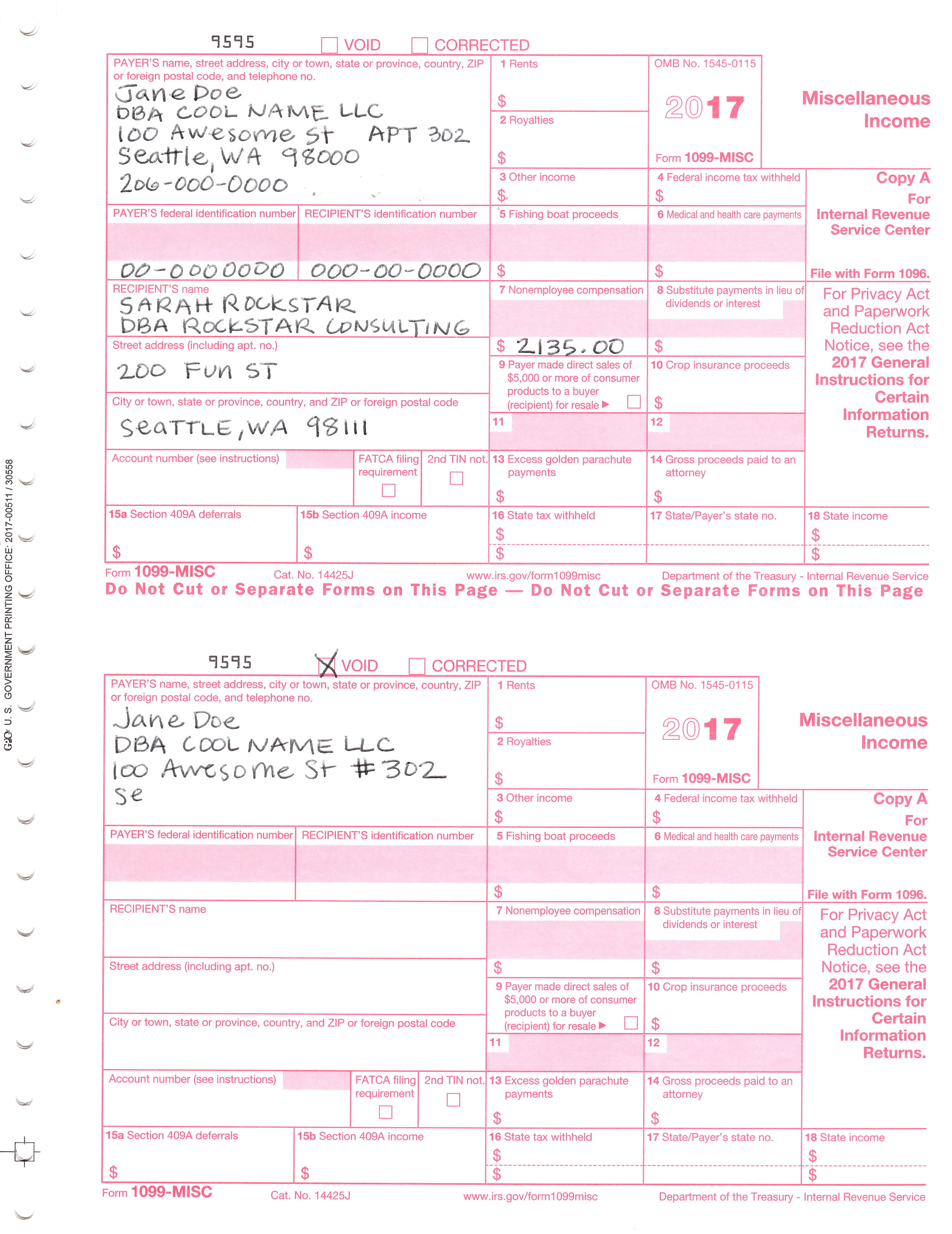
Notice the names. It's important to write both the recipients full legal name AND the business's legal name.

Whenever a business is a Sole Proprietor or Single Member LLC, you may use either the SSN (social security number) OR an EIN (employer identification number).
This example shows the Payer having an EIN.
The recipient using their SSN.
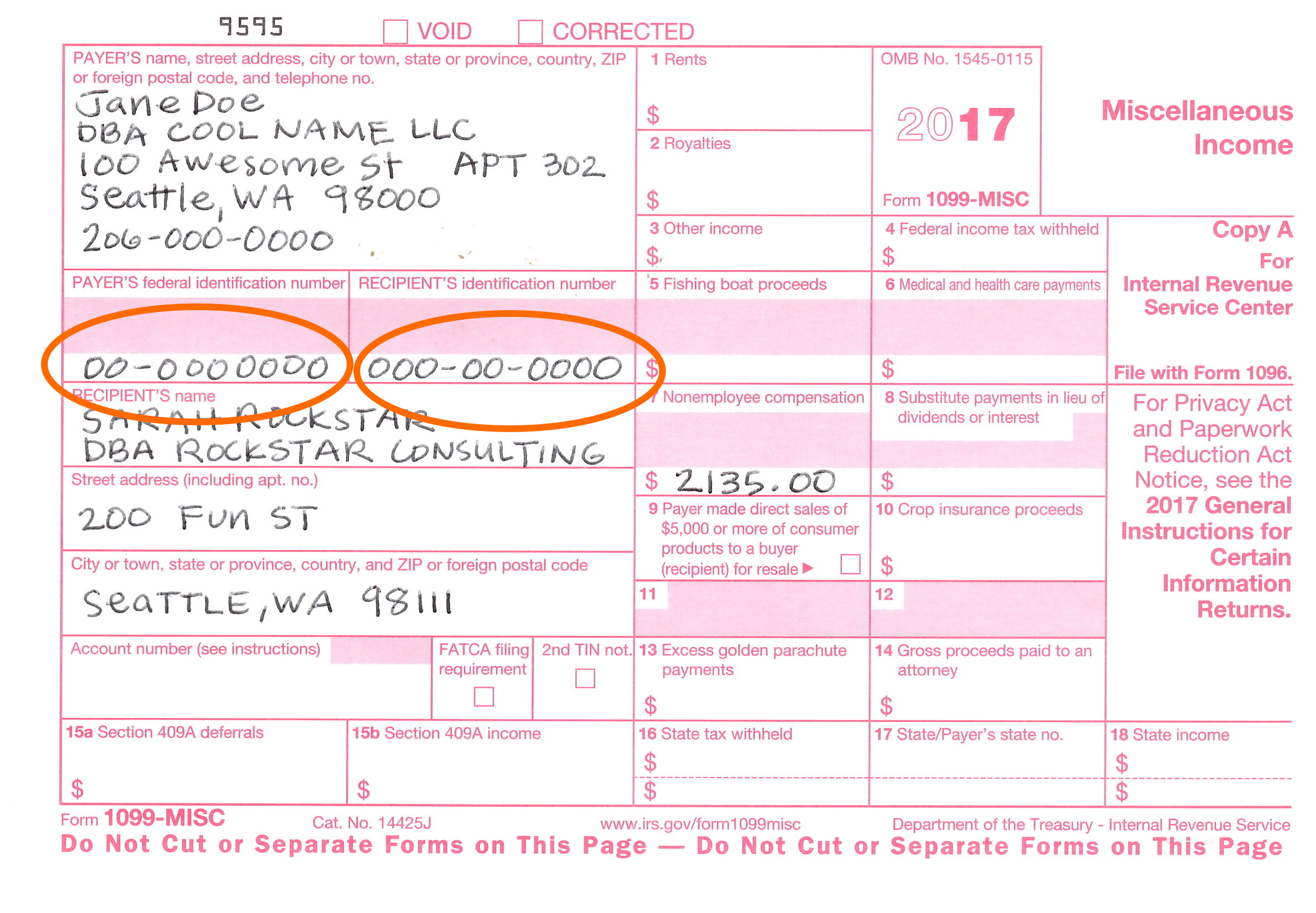
On the bottom form, I made a mistake! I used a # sign. This is not allowed, so I stopped filling it out and marked the VOID box.

After they are filled out, tear the strip off and separate the forms.
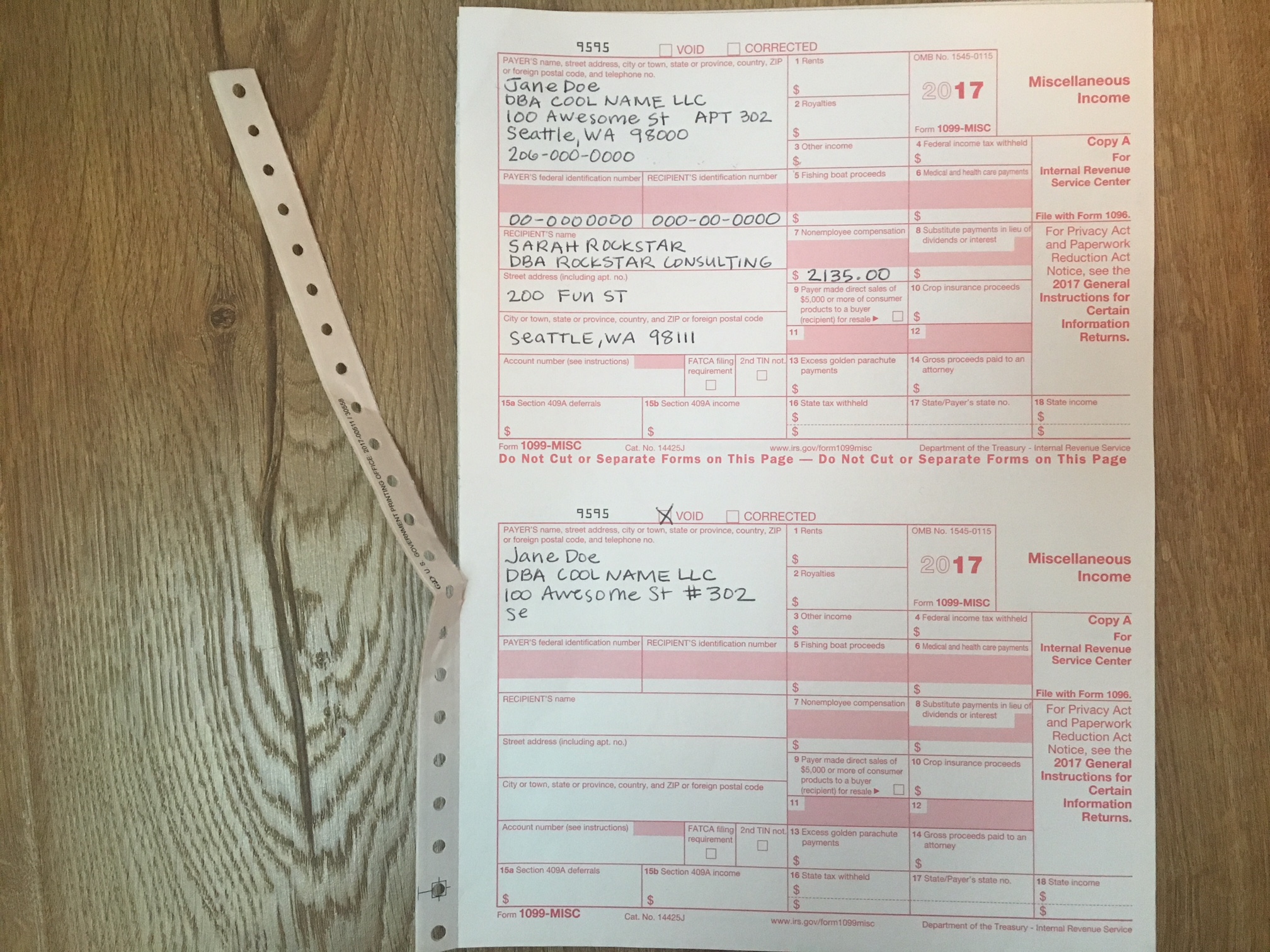

Look for THREE to keep, and do the following:
1. For the IRS - send in the mail, in a flat envelope
2. For Recipient - send in the mail, may be folded
3. For Payer - keep in your tax records
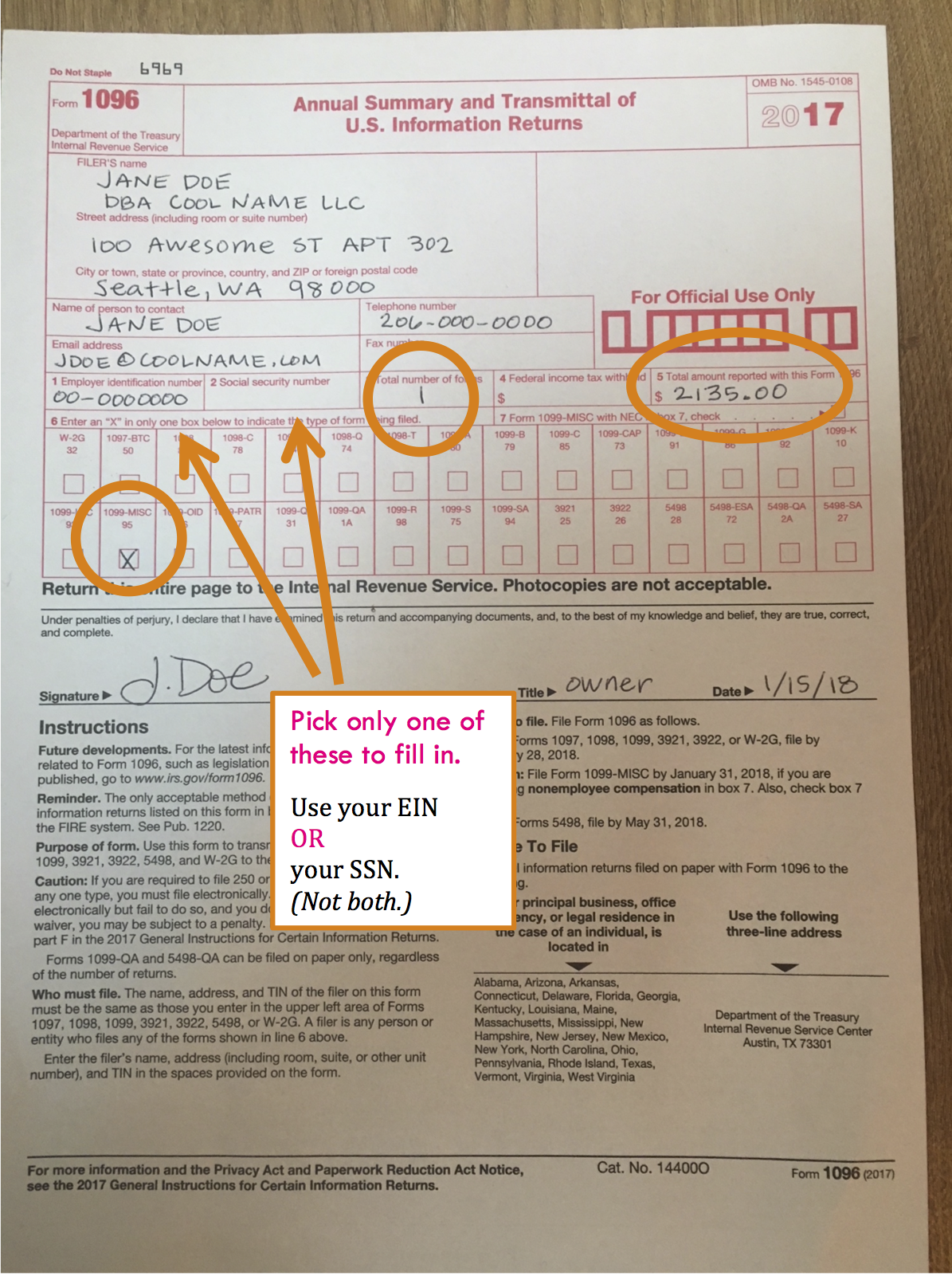
Here's a look at the 1096 Form.
Moving from left to right with notes:
1. Be sure to check the box 1099-MISC.
2. Use your EIN ....OR.....your SSN. (Not both)
3. Number of forms. Put the number of filled out 1099-MISCs. There are two per page. If you filled out for 3 recipients, you'd write "3".
4. "Total amount reported with this Form" Add up the total of all dollar amounts on all forms. If I was reporting $2100 for a coach and $1400 for a designer, I would record $3500 in this box.
Finishing up!
To the IRS - one 1096 form plus the top copies of all 1099-MISCs
To the recipients - their 1099-MISC copy
For your records - full page copies

Well done! Bravo! Even though the contents of this are straightforward, it can feel so taxing because it takes a lot of care and attention, yet it is boring. In addition, just the thought of the IRS can be triggering or get the adrenaline going. ♥ If you can, find a time to relax a bit. Perhaps a bath, a trip to Ladywell's, a long walk, even a short walk around the block.
Also, remember to check off of your Cheat Sheet / Sticker Chart!
Cheers!
: ) Jenny Girl Friday
P.S. Sign up for Sidekick Services to get these delivered right to your inbox! (Posting on social media is random....)
• How to Set Up Your Business in Seattle - as an LLC / PLLC

A Bigger Splash, David Hockney • Credit below.
Setting up an LLC business doesn't take much time! ….That is, if you know what to do, what you need, and the right order of steps. Here's where I've got you covered.
(Not sure if you want an LLC? Read Sole Proprietor or LLC: Which is Best for Me?)
Below is the quick and dirty list. Detailed notes are at the bottom of the post.
If you know your business name(s), the whole process takes about one hour.
Go ahead, take the plunge!
Pro Tip: Get a journal to record all your log-ins, passwords, IDs, and various notes as you go through the process. Use in the future for all research and calls related to taxes and licensing.
1) Register your LLC / PLLC.
Through: the Washington Secretary of State
Click here to go directly to registration.
Cost: $200
Time: 10 minutes
2) Pause + wait for your UBI
You'll need your UBI to go on to the next steps. (Unified Business Identifier.) It's a lot like your social security number, in that it's a tax ID number assigned to you ... and banks and other organizations will ask for it to identify you. It'll be provided along with your LLC documents. Most often, it's in a 9 digit format. Sometimes it'll be in a 16 digit format, where there are 0s and 1s at the end, noting your "business ID" and "location ID".
3) Apply for your state business license.
Through: Washington State Business Licensing Service (BLS)
Uses MyDOR portal.
Click here to go to read more information on the BLS.WA.gov site
Cost: $19 plus $5 for each DBA
Time: 15 - 20 minutes
4) Apply for your city business license.
Through: City of Seattle Business Department
Uses the FileLocal Portal.
Click here to read more on the city’s website
Cost: $113 for standard, $56 if you plan to gross under $20K per year.
Time: 15 - 20 minutes
That's it! You're in business. …but you're not quite done. To be legal, you need to ensure that you have all of the special permits and licenses for your line of business.
5) Optional ~ Apply for an EIN
EIN stands for Employer Identification Number. It's a tax ID number assigned to businesses by the IRS. If you are a sole prop or a single-member LLC, you are allowed to use your SSN for business purposes. Having said that, banks and online forms will often required you to have an EIN. The issue is that the number formatting is different. With your social security number, it looks like 000-00-0000. With an EIN, it looks like 00-0000000.
Good news! It's easy, free, and only takes 10 minutes. Here's the link: Get EIN on IRS.gov. Or, go to IRS.gov and search for EIN. Heads up, this web service is only available during the daytime.
6) Do your due diligence.
At the state level, check the List of Licenses
This is a list by trade, with links to relevant licensing agencies.
Here's the list of Endorsements required by some businesses.
Or, call the BLS: 1-800-451-7985
And, at the city level, check the Regulatory Endorsements page.
Or, call the City of Seattle: 206.684.2489
Another nice tool is the WA Business Hub. It's created to walk anyone through the setting up a business. There's a TON on there.
7) Celebrate!
* * Please note: The intent of this post is to get you started! And, to provide you with the required framework for every business. Your field may require additional permitting or specialty licenses not covered here. For best results, call the city or state.
Happy Working,
Jenny Girl Friday
Some Helpful Details
With the LLC Registration
Some things you'll be asked:
• the legal name of your company
• 2 alternate names
• start date - day of filing, or a specific date
(Tip: pick one that's easy to remember or has meaning for you.)
• perpetual or specific time period
Mostly, you will have to put your name and address in a million times. Because, as a single-member LLC, you are the member, the manager, the agent, and registrar. You fill all the roles.
Even though you will be a limited liability company, LLCs are handled along with the corporations.
For the State Business License
Some things you'll be asked:
• the UBI - you get this when your LLC goes through - it is your Unified Business Identifier
• what bank you'll be using
• your SSN and your partner's SSN
• description of your business: 1- 2 sentences
• trade name(s)
• which cities you'll be doing business in (you need a license for each one)
For the City Business License
Some things you'll be asked:
• the UBI - you get this when your LLC goes through - it is your Unified Business Identifier
• estimated income
• Meet FileLocal - Seattle's New Portal for License Renewal and B & O Tax Reporting
Important Note: Filelocal has changed it’s sign up process, so the screenshots will look different than what you see below. This will still give you a general idea. I hope to update soon! ~ January 16, 2019
Grab some coffee (maybe wine), a few deep breaths, perhaps a friend ... and get ready to set up your FileLocal account.
Estimated Time: 10 - 25 minutes
Frustration Factor: 4 out of 10
Cost: Free
Recommended Timeframe: November or December
If you're self-employed in Seattle, the city requires three things of you:
• Get a city business license, when you start
• Renew city business license, annually
• Make a report of Gross Sales, annually*
If you make over $100K, then there's a fourth requirement: paying B & O taxes.
*For most. Some businesses are required to report quarterly.
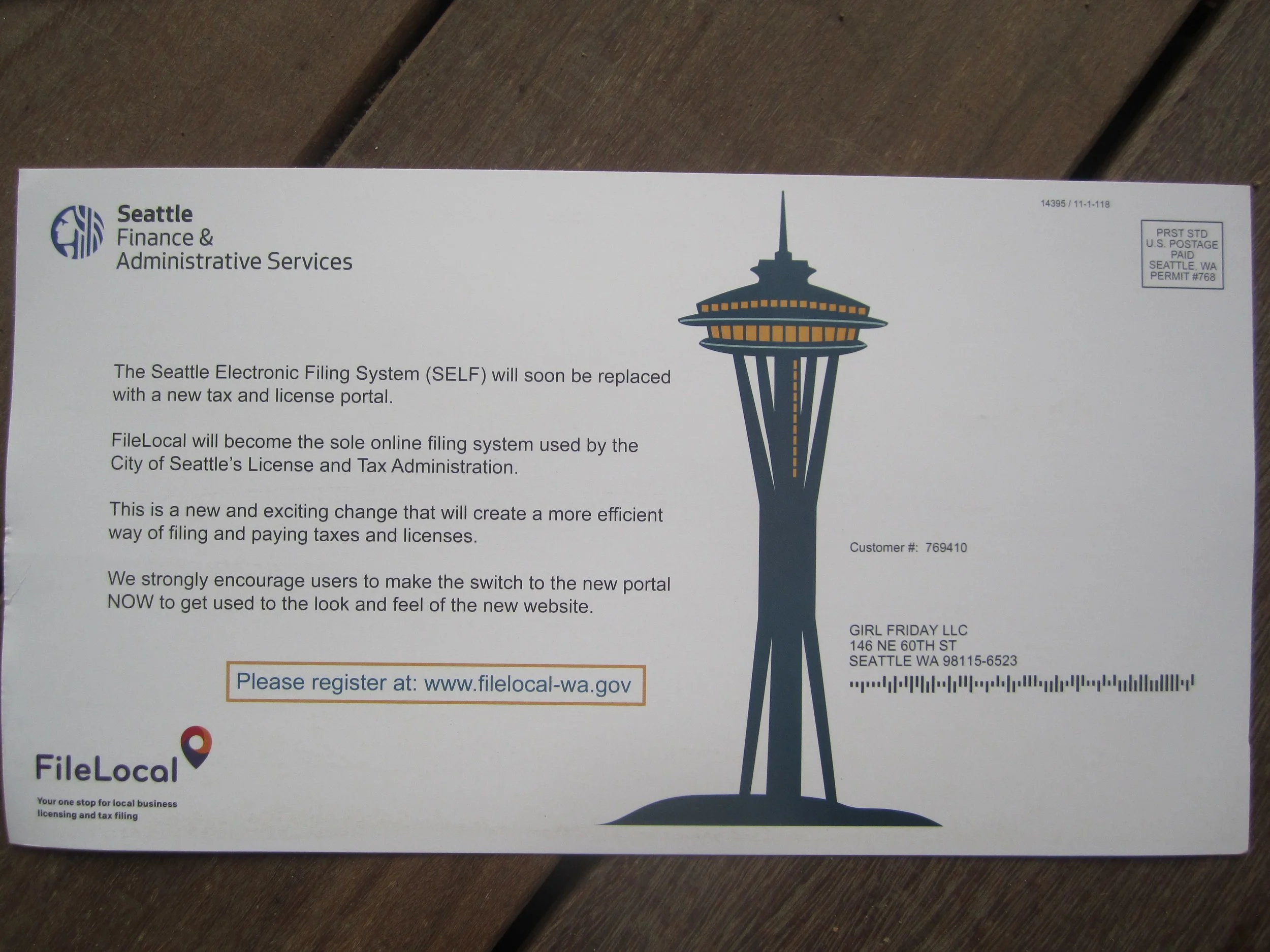
In the past, Seattle used a portal called SELF. It's now switching over to FileLocal.
The city's encouraging us to set up our FileLocal account sooner than later ... and I can sure see why! I just ran through it this morning, hit a snag, and had to find a ton of information! Not to worry, I've got you covered. :)
FileLocal asks for ALL of your business numbers. You can either find these things as you go, or look them up ahead of time. It definitely took me a little rummaging... This list might vary in order from the application. ProTip: If you haven't already, write all your numbers in one special notebook.

The List in Brief (details below):
1. Federal Tax Number
2. UBI - 16 digit version
3. NAICS code
4. Seattle Customer Number
1. Federal Tax Number. If you are a sole prop or a single-member LLC, you might be using your SSN for this. This is totally fine for the IRS. However, this form requires you to have an EIN! (Or FEIN.) So, if you don't have one already, you'll need to get one. It's easy, free, and only takes 10 minutes. Here's the link: Get EIN on IRS.gov. Or, go to IRS.gov and search for EIN. Heads up, this web service is only available during the daytime.
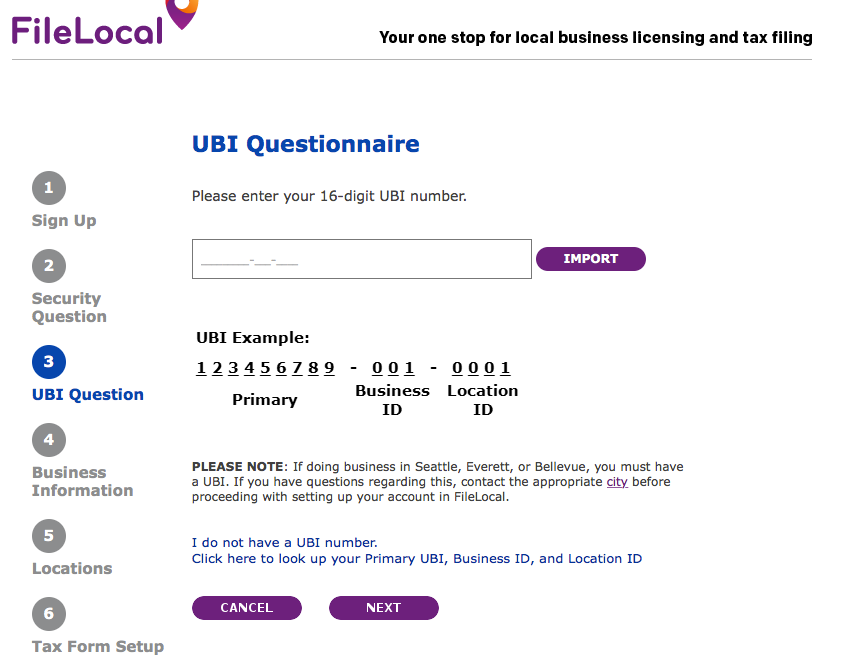
2. UBI - 16 digit version. This is your WA state business number + some codes. (UBI stands for Unified Business Identifier.) Usually, we only use 9 digits. It's in the form ###-###-###. The 16 digit version asks you to add two numbers at the end. Your Business ID and Location ID. If you only have one office, then it's easy. Business ID is 001, and Location ID is 0001.
So, your number will look like ### ### ### 001 0001. Screenshot below.
To find your UBI, you can: look on your LLC certificate (if you have one), look on your WA state business license, or look on your city license. OR, you can search for your business at the DOR lookup.
3. NAICS code. This is a code assigned to your business by the state. It's used for statistical purposes only. The easiest way to find it is to use the DOR lookup. Once the search results come up, select your business, view your profile, and the code will be listed there. The other option is to select one that matches your business ... using the dropdown menu on the FileLocal form.
4. Seattle Customer Number. Early in the application it asks for "City Account Number". It wants the Seattle Customer Number that's been assigned to you. It also comes up if you want to search for your UBI. On that screen, it asks for your Validation or Verification number. (I can't remember which.) Your Seattle Customer Number is the ticket there.
To find your Seattle Customer Number, look on your city business license, or sign into the SELF Portal, and look at your list of businesses. It's listed next to the name of your business.
Summary
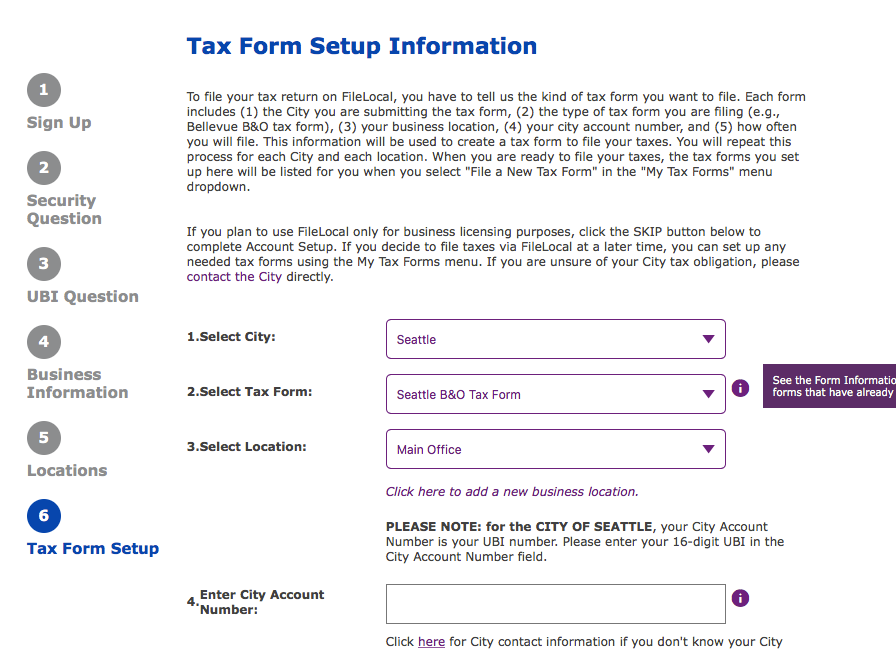
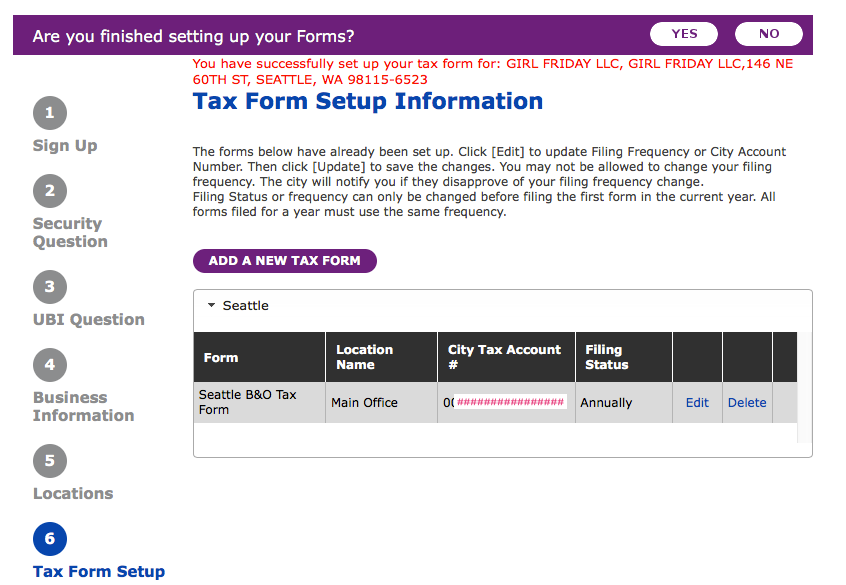
In this process, you provide your basic contact information, then all of your government numbers (so it can link up to those accounts) ... then at the end ... the whole point is to add the Tax Forms you'll be filing. For now, this is only the "Seattle B & O Tax form". Screenshot below.
The SNAG I Hit + Getting Help
On one of the last screens, it said that my UBI didn't match my business location! I called the Help number listed on the FileLocal site. They directed me to the city of Seattle. It turns out, the city had my incorrect UBI! These things happen, I suppose.
The guy helping me was super, super nice. He fixed it and the FileLocal site worked immediately.
Help Numbers:
Seattle: 206.684.8484
FileLocal: 877-693-4435
Now, for some pictures + notes:
Out with the Old - Seattle SELF Portal
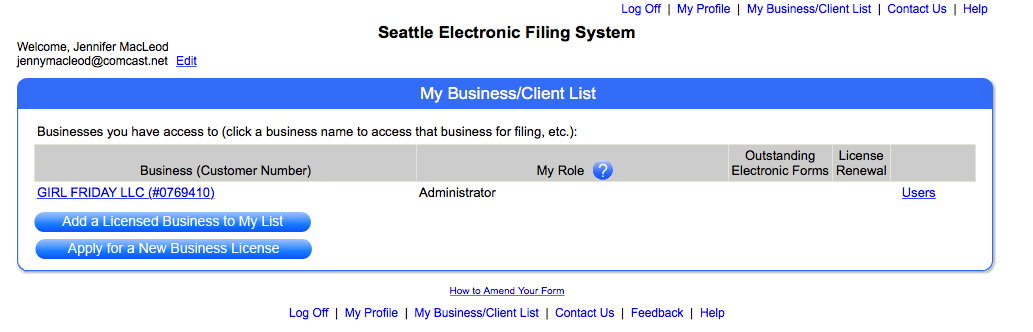
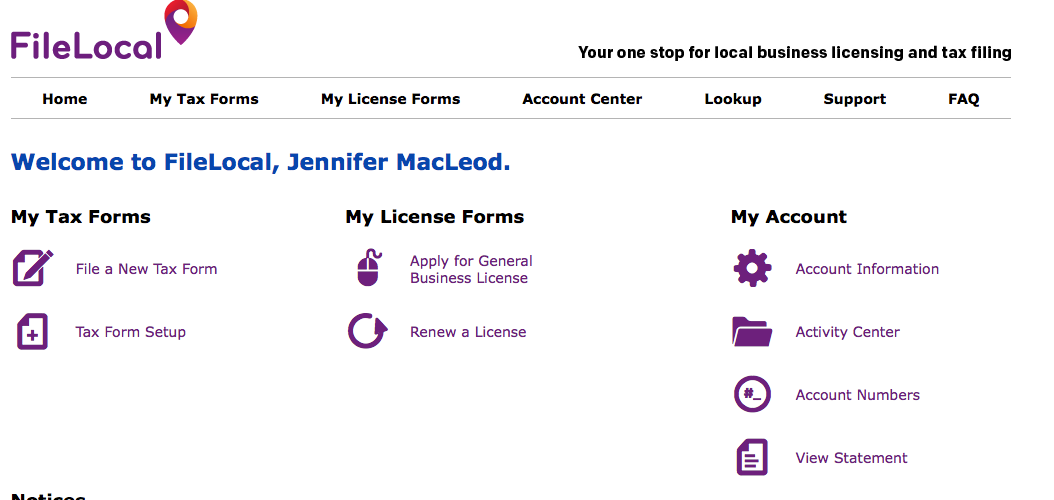
In with the New - the FileLocal Dashboard. (You won't see this screen until the very end.)
A few Screenshots along the application
This one shows the 16 digit UBI. Also NOTE: the circles on the left refer to the screens...they don't match the content on the right.
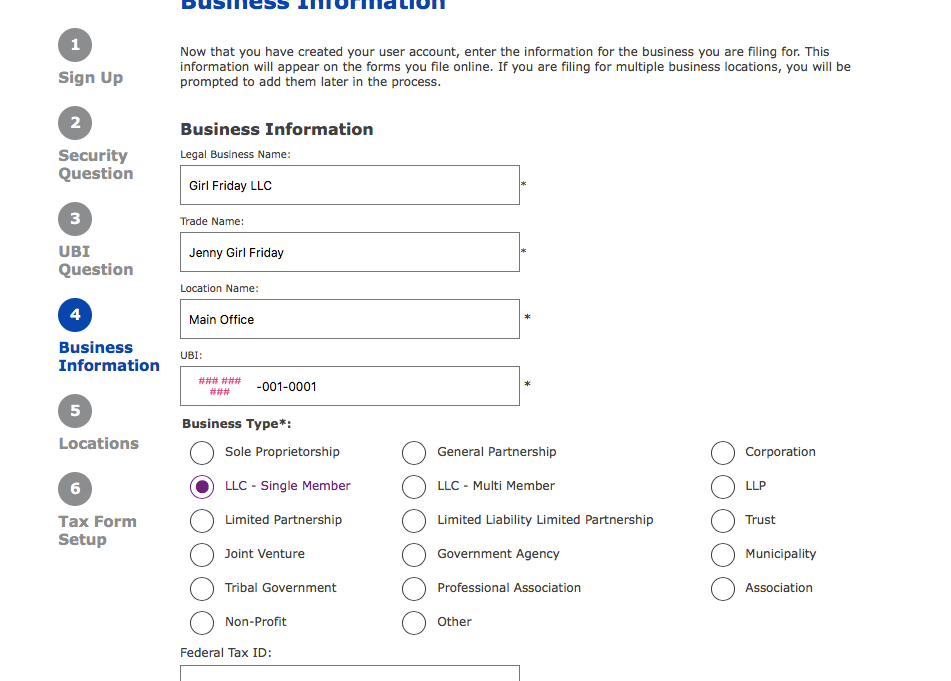
YOU CAN EITHER IMPORT YOUR WA BUSINESS DATA, OR PUT IT IN MANUALLY. IF YOU IMPORT IT, IT WILL ASK YOU FOR A VALIDATION NUMBER. THIS IS YOUR 6 DIGIT CITY CUSTOMER NUMBER.

If you're a PLLC, it looks like you'll have to choose LLC - Single Member.
At the end, they're asking you which Tax Forms you want to file through their portal. The one you want is "Seattle B & O Tax Form".
Haha...when you're all done, it congratulates you in red ... as if it's an error message! Reroute your brain to the word, 'successfully'. Cheers and head out to Ladywell's or have bubble bath. (Maybe Try the amazing Bath Bombs with Braddington Soaps!)
Bravo!
: ) Jenny Girl Friday
P.S. Please share freely with your friends who are self-employed!